- The Inbox
- Posts
- How we saved a brand $70K in one month by making one simple change
How we saved a brand $70K in one month by making one simple change

Max Sturtevant
January 23, 2026

The Inbox Newsletter

Hey it’s Max from The Inbox Newsletter.
Recently, I was auditing our client’s subscription strategy and noticed something shocking.
They were losing $130K per month in subscription cancellations.
Looking at Klaviyo, over 50% of those cancellations came directly from email campaigns.
We made one change and saved them $70K in one month.
Here's what we did.
The Problem
The brand was doing everything right with their email strategy.
Sending 4-5 campaigns per week. Strong flows. Good creative. Solid open rates.
But their subscription cancellations were through the roof. $129K per month in lost recurring revenue.
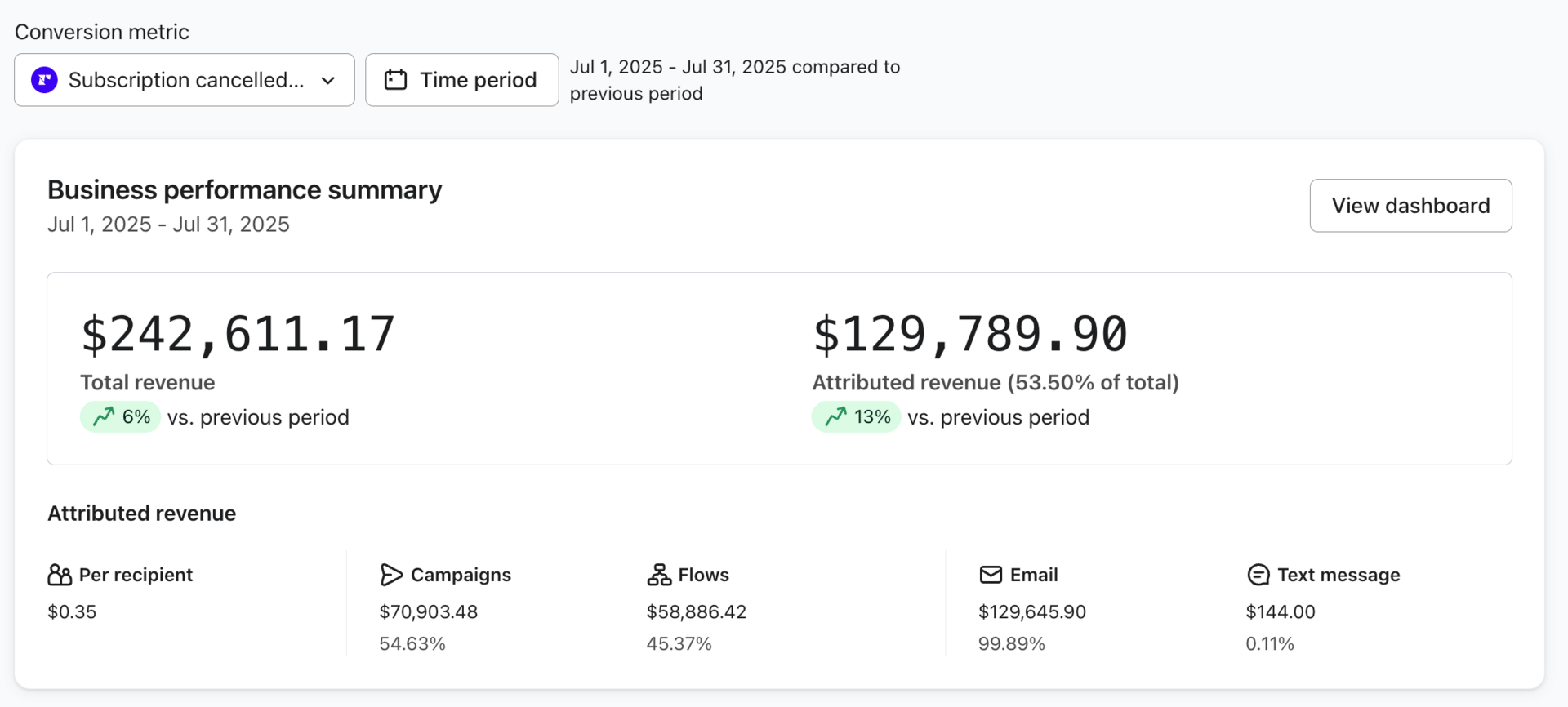
$129k revenue lost due to cancelled subscriptions.
When we pulled the data in Klaviyo, the issue was obvious:
54% of cancellations were happening from email campaigns.
Campaigns were the #1 driver of churn.
Why This Happens
This is what I learned after managing emails for multiple subscription brands:
Emailing a product subscriber is fundamentally different than emailing a regular customer.
Emailing someone who bought from you once, reminds them you exist. That's good.
But emailing someone who's subscribed to your product, is another reminder that they they have an upcoming charge. That's bad.
Even if they love your product, every campaign that hits their inbox is a subtle reminder: "Hey, we're about to charge you again."
That triggers defense mode. They start thinking about money leaving their account, not value coming in.
"Do I really need this?"
"Am I using this enough?"
"Should I cancel?"
And then they do.
The Solution: Stop Emailing Them So Much!
We tried something different.
We stopped sending campaigns to their subscription list entirely. Only sent 1-2 campaigns per month for major announcements.
That's it.
The results:
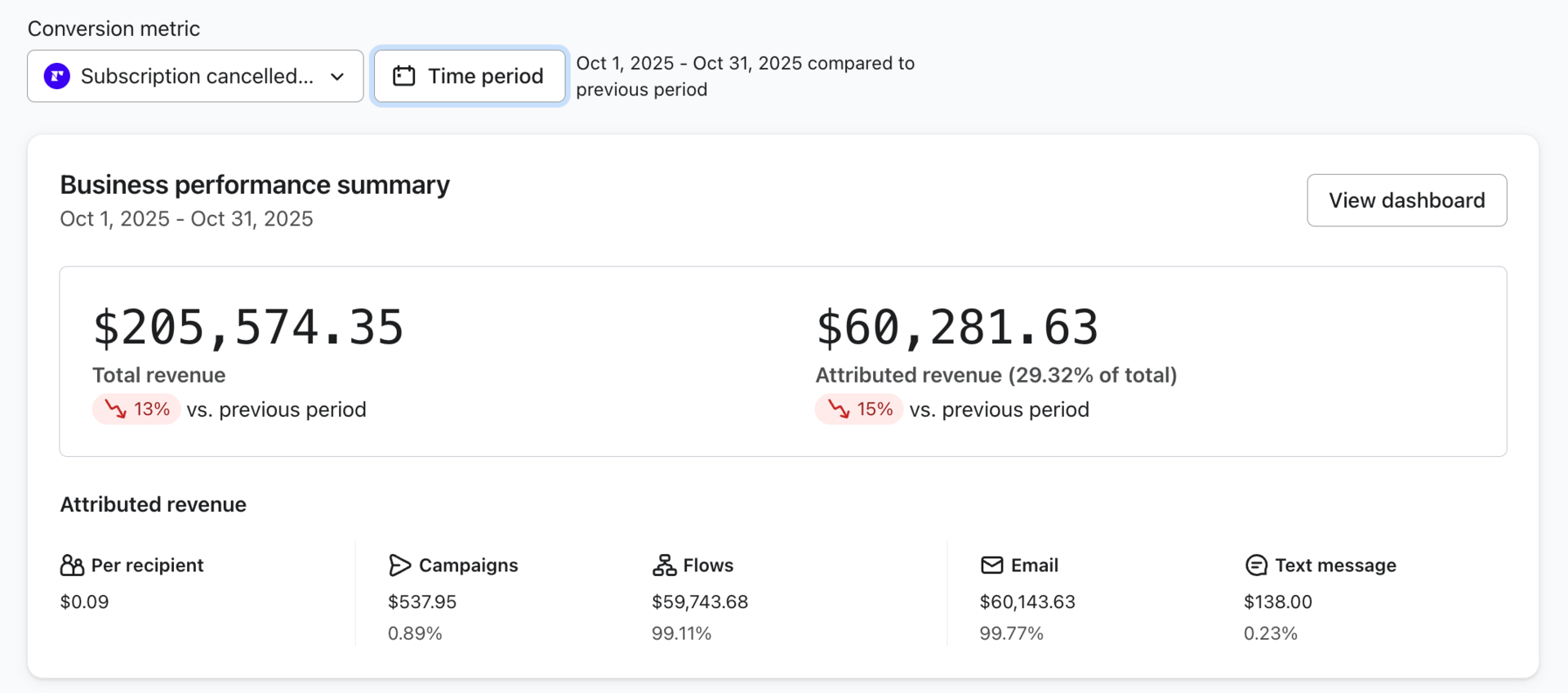
Cancellation revenue down to $60k.
Before: $129K in monthly cancellations, 54% from campaigns
After: $60K in monthly cancellations, less than 1% from campaigns
That's $70K saved in one month.
The only thing we changed was email frequency to subscribers.
How to Implement This in Klaviyo
Here's exactly how to set this up:
Step 1: Create a "Product Subscribers" segment
Go to Klaviyo → Lists & Segments → Create Segment
Set the condition: "Has an active subscription" or "Subscribed to product = True" (depending on how your subscription platform syncs with Klaviyo)
Step 2: Exclude this segment from your regular campaigns
Every time you send a campaign, go to "Recipients" and exclude the "Product Subscribers" segment.
This ensures your regular customers get 4-5 emails per week, but your subscribers only get the campaigns you manually choose to send them.
Step 3: Send 1-2 campaigns per month to subscribers only
Keep it to major drops and big announcements. Your product subscribers don’t need to know about every single sale anyways since its not relevant to them.
Keep it minimal.
Subscribers Need a Different Strategy
Your subscribers and non-subscribers need completely different email strategies.
For your regular list: Send 4-5 campaigns per week like normal. Hammer them with offers, product drops, content. That's how you drive revenue.
For product subscribers: 1-2 campaigns per month max for major announcements. That's it.
If your subscription program is good, they'll stay subscribed without you needing to constantly email them.
Email Inspiration Of The Day
Brand: Rolex
Email Design: https://drive.google.com/file/d/1SnK82ZGc1MpWpjZFCAL09bLwD6DQxenl/view?usp=sharing
Notes: Rolex scores an A from the Well Copy school of design. Simple, yet effective hero section with a button above the fold. It’s skimmable, it’s sexy, and it’s an email marketer’s wet dream
Reply to this email if you have any questions or further content you want covered.
Cheers,
Max Sturtevant | Well Copy
How I Can Help You:
Work With My Agency To Manage Your Email / SMS: Learn More »
Join My 90 Day Email Insiders Mentorship Program: Learn More »
Free & Paid Guides / Resources: Learn More »
Join My Team: Apply Here »