- The Inbox
- Posts
- How to Grow Your Email List on Autopilot Using Instagram DMs
How to Grow Your Email List on Autopilot Using Instagram DMs

Max Sturtevant
January 14, 2026

The Inbox Newsletter

Hey it’s Max from The Inbox Newsletter.
Manychat just launched a feature that lets you auto-DM every new Instagram follower.
Instead of letting new followers scroll away, you can automatically offer them a discount, capture their email in the DM, and add them to your Klaviyo list.
All on autopilot.
Here's how to set it up in less than 5 minutes.
Key Takeaways:
Auto-DM new followers within 30 seconds of following you
Capture emails directly in Instagram DMs (no link out required)
Automatically add them to your Klaviyo welcome flow
Works 24/7 without manual effort
Setup takes less than 5 minutes
How It Looks
If you run an e-commerce brand, list growth is a major factor in your email revenue.
This is what the experience looks like. Someone follows you, waits 30 seconds, then gets a DM offering a discount. They reply with their email, and you add them to your list automatically.
Here's how the pipeline works:
New Follower → Wait 30 Seconds → Auto-DM Welcome Offer → Capture Email → Add to Klaviyo
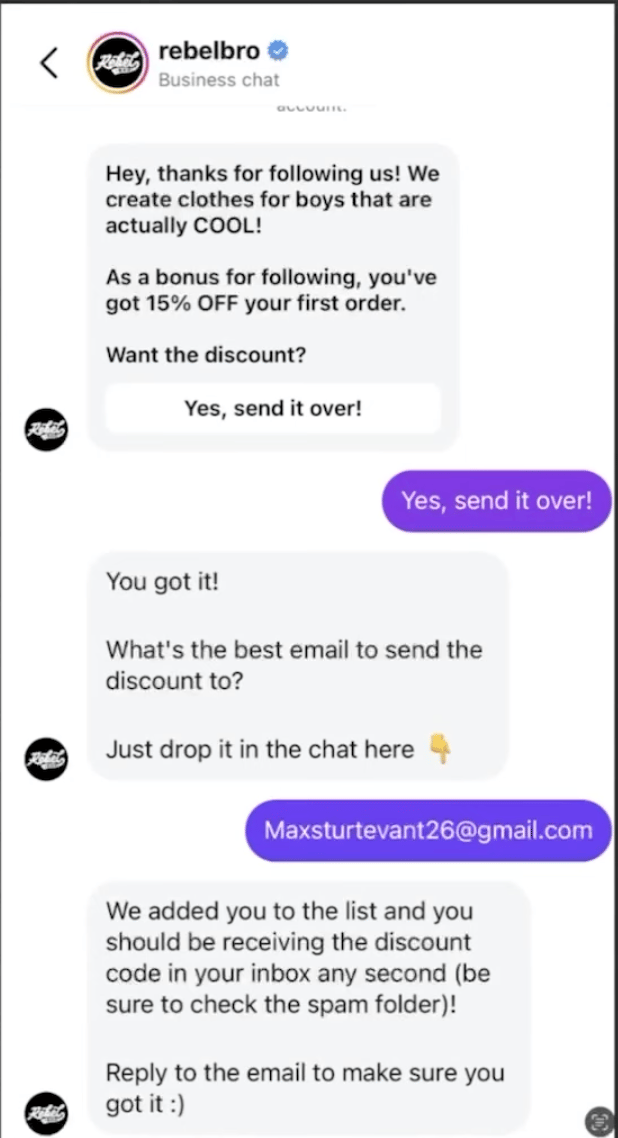
Example Flow
What You Need
To set this up, you'll need:
Manychat (for Instagram DM automation)
Klaviyo (to manage your email list)
If you don't have Manychat yet, sign up at manychat.com and connect your Instagram account.
Step 1: Connect Manychat to Klaviyo
First, you need to integrate Manychat with Klaviyo so they can talk to each other.
Step 1: Go to Manychat Settings → Integrations
Step 2: Paste your Klaviyo Public & Private API keys (you can find these in Klaviyo under Settings → API Keys)
Step 3: Create a new automation called "Say Hi to New Followers"

After Klaviyo integration is set up, select “Say hi to new followers” automation
Step 2: Build the Auto-DM Flow
Once the integration is live, you need to build the automation that fires when someone follows you.

Switch to flow builder for more customization options.
Open the automation, set it live, pause it, and then switch to the Flow Builder. This gives you access to advanced customization options.
The automation should trigger "When someone new follows you" and wait 30 seconds before sending the first message.
Here's the message structure:
Message 1: "Hey there! Thanks for following me. Now that you're part of the crew, I'd love to share something special as a thank you. Want to check it out?"
Button: "Yes, send it over!"
This creates engagement. They have to click to proceed.
Step 3: Capture Their Email
After they click "Yes, send it over!" you need to prompt them to enter their email.
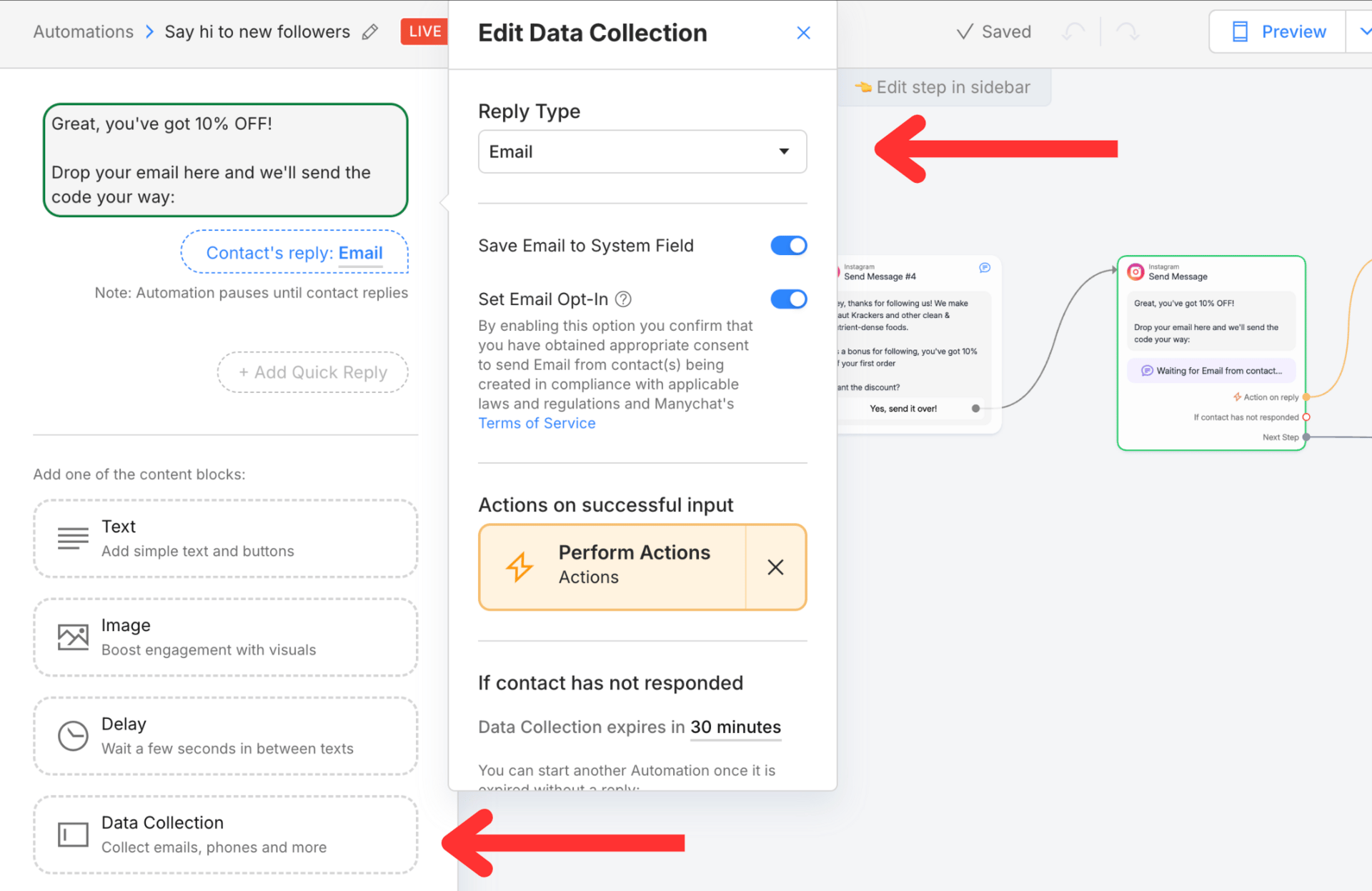
How do add collect email from the automation.
Add a "Data Collection" step and set the reply type to "Email."
The message should say: "Great, you've got 10% OFF! Drop your email here and we'll send the code your way."
Manychat will wait for them to reply with their email address. Once they do, it captures it automatically.
Step 4: Send to Klaviyo
Now that you have their email, you need to add them to Klaviyo.

Action step to update profile in Klaviyo
Choose "Action on Reply" and select "Klaviyo Actions: Create or update a Contact in a list."
Select your Klaviyo welcome flow email list. This automatically adds them to your welcome series.
Finally, send them a confirmation message in the DM:
"You've unlocked 10% OFF! Use code KRAU7TEM at checkout to claim (expires in 24 hours). Head to our site here [link]. Browse Site."
The Result
In less than 5 minutes, you've set up an entirely new list growth strategy.
Every time someone follows you on Instagram, they automatically get a welcome offer, you capture their email, and they're added to your Klaviyo list.
This runs 24/7 without any manual effort.
At Well Copy, we're constantly hunting for hacks like this that make our 7-9 figure e-commerce clients money. This is one of the easiest wins you can implement today.
If you want help setting this up or auditing your entire email strategy, book a free Klaviyo audit here.
Prefer a Video?
I made a full walkthrough of this process on my Youtube channel.
Email Inspiration Of The Day
Brand: Snif Society
Email Design: https://drive.google.com/file/d/1W9aEF_qvEvBvpg-zGI2Kvl7FP7K0uORK/view?usp=sharing
Notes: Simple, bold hero image. Great design with a button above the fold. The hero does all the heavy lifting on this email.
Template of The Day

Hero Section Template #18
If you want access to a bank of 134 mix and match templates like this equating to over 5,000+ possible email designs, click here »
Reply to this email if you have any questions or further content you want covered.
Cheers,
Max | Well Copy Email & SMS Marketing
If you want to join our team, fill out this form»
PS - If you run a 7-9 figure ecommerce brand and you want to have a free email strategy consultation, book a call here »
PPS - I have a few different products you can buy. If you purchase any one of these products you get access to my private community of 1500+ members with daily posts from me, access to me for support 24/7, and private calls.
Ecommerce Email Mastery: A 60 lesson course breaking down everything you need to know about ecommerce email marketing in the most concise and organized manner. learn more »
Mix and Match Email Design Templates: 134 email section templates that can make 5,000+ unique email designs with, learn more »
QuickFlow Templates: All core 7 core email marketing flows fully templatized with examples, learn more »